 Comment Export
Google Sheets keeps comments somewhere you can't sort them, count them, or get them out. If your review cycle happens in the comments, there's no way to answer "how many are still open" or "which ones are on the forecast tab" without opening them one at a time.
This is a Google Workspace add-on that puts them all in a tab. There's also a browser version that needs no install, which is what I built first.
Install it: Comment Export for Sheets™ is live on the Google Workspace Marketplace, so it installs in one click from inside Sheets: Extensions → Add-ons → Get add-ons, then search for comment export. The browser version still needs no install and no permissions at all, and the source is public either way.
What it writes
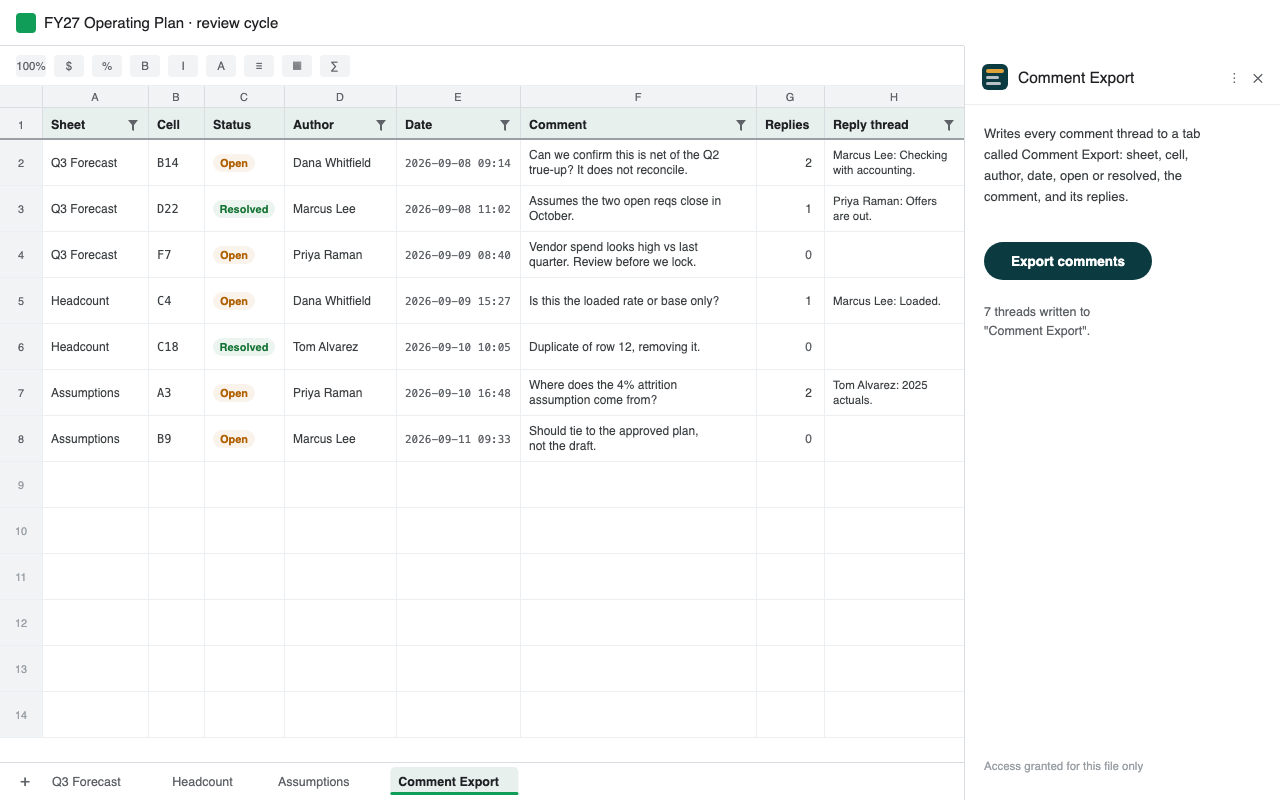
Press one button and it adds a sheet called Comment Export to your spreadsheet, one row per comment thread:
- Sheet and Cell, so you know where the comment lives
- Status, open or resolved
- Author and Date
- Comment, and the full reply thread beneath it
It arrives with a filter already applied and the header frozen, in the order the comments appear in the spreadsheet: tab by tab, then down the rows. From there it's ordinary spreadsheet data. Sort it, pivot it, download it as CSV, or paste it into a status update.
Rerunning it refreshes the tab in place. It never edits, resolves or deletes the comments themselves.
The use I didn't expect
Sorting is the obvious reason to use it. The one that ended up mattering more is context.
A spreadsheet's cells carry its numbers. Its comments carry the argument about those numbers: why this assumption, what the pushback was, which figure is still contested and who contested it. That's often the only written record of how the model got to its numbers, and it sits in a sidebar nothing else can read.
So when you give a spreadsheet to a language model, it gets the numbers and none of the reasoning. It sees 4.2% and misses the three people who spent a week arguing about whether 4.2% was defensible.
And nothing warns you. Copy the cells and paste them into a chat and the comments don't
come with them. Upload the .xlsx and the comment records are technically
inside the file, but the usual ways of reading one return the values and nothing else.
Export to CSV or PDF and they're gone. Either way you get a confident answer from a
spreadsheet that's been stripped of its reasoning.
Writing the threads into a tab fixes that. The discussion becomes ordinary rows you can copy, download as CSV, attach, or paste in next to the numbers they belong to.
It helps with the everyday uses too. Once the threads are rows you can search, filter and archive them, so a review cycle that happened in comments still leaves a record after the quarter closes.
Who it's for
Anyone whose review process lives in the comments: finance teams closing a budget, analysts working through data quality, operations teams running a planning cycle. People who'd rather work down a list of open threads than open them one at a time.
Privacy
There's no server behind this. Access is granted one file at a time, so it never asks for permission to your Drive, and the only address it can contact is Google's own Drive API. The add-on's manifest enforces that. Your comments go from your spreadsheet, through Google's infrastructure, back into your spreadsheet. There are no analytics or accounts, and nothing is retained.
The privacy policy and terms of service spell out exactly what it does and doesn't do.
Good to know
- It reads comments. Notes are a separate Sheets feature and don't appear.
- Google caps the export it relies on at 10MB, so a very large workbook may not run. If that happens, you get a clear message.
- It's free. There's no paid tier.
How I built it
Google's comments API tells you what a comment says but not where it is: the anchor it returns is an opaque range id that doesn't point to anything you can reach. The spreadsheet's own .xlsx export does carry the sheet and the cell, so the add-on asks Drive for that export and reads the comment records straight out of it. Everything runs inside Apps Script, under your account.
That's also why other tools leave it out. There are add-ons that export Sheets
comments, and the closest one reports the text or content of the commented cell instead of
its reference. Content can't locate anything, since 4.2% might sit in fifty
places. The cell reference is what makes an export usable, and the documented API won't
give it to you.
I built it in an evening. That was only possible because the hard part, the parsing, already existed.
The browser version
Before the add-on there was CommentPulse, which does the same job as a web page: download your sheet as .xlsx, drop it in, and the threads come back in order. Nothing is uploaded, there is no sign-in, and it needs no permission from anyone.
It's still there, and it's still the better choice in two cases. If your Workspace admin blocks add-ons, it's the only version you can run. And if you just want the list once without granting access to anything, dropping in a file is faster than installing software.
The source
Open source, MIT, at github.com/bsunter93/comment-export-for-sheets. Three files. The README covers the opaque comment anchor and the part-numbering trap in the xlsx export. I couldn't find either written down anywhere, and both cost me an evening.